SaaS Dashboard Pro - Next.js Dashboard Template
Who SaaS Dashboard Pro is for
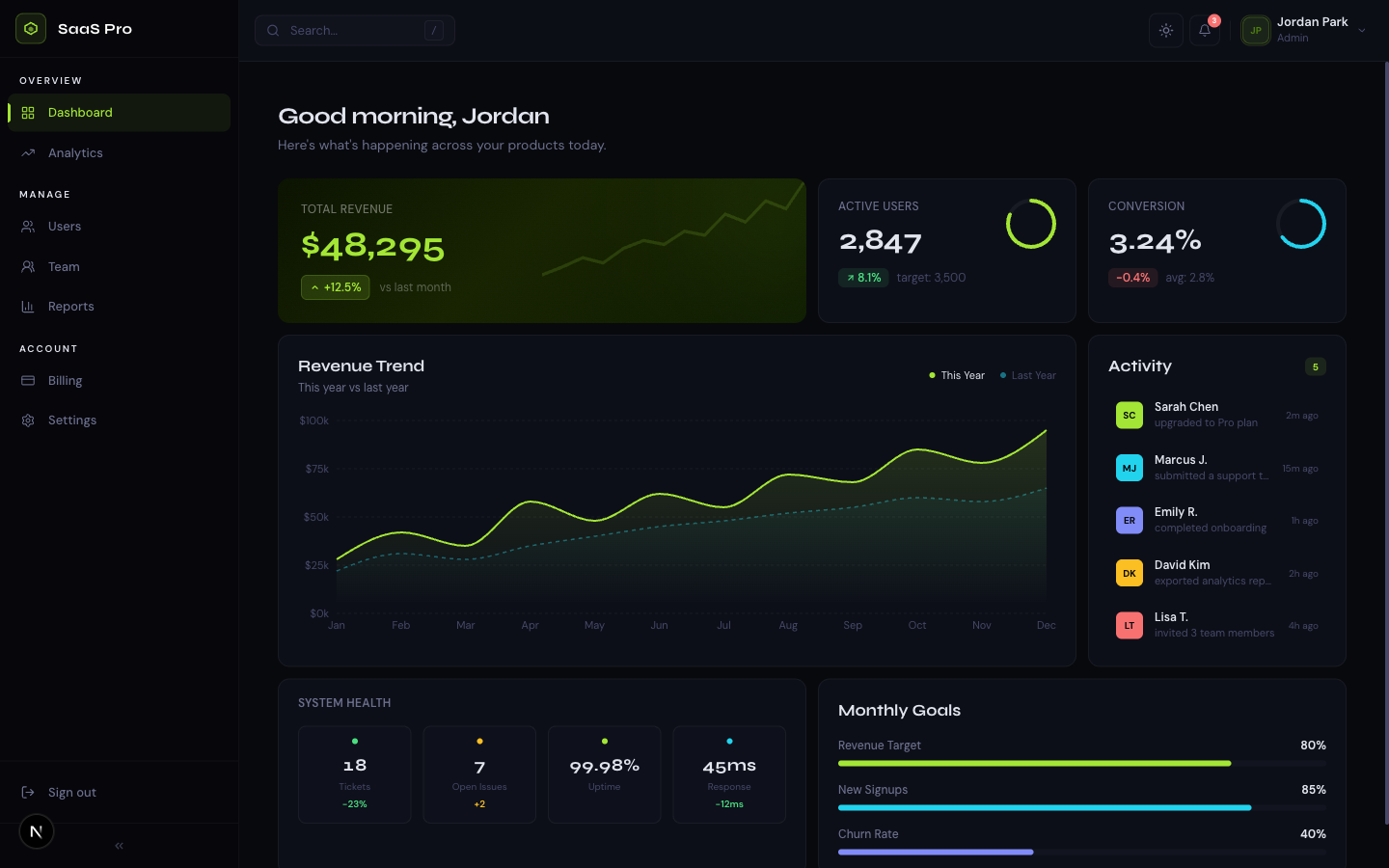
SaaS Dashboard Pro is for founders and product teams who need a complete admin dashboard - not a component kit to assemble, but nine pages of working UI ready to wire to your backend. The distinctive midnight + electric lime design system gives it the kind of visual identity that reads as 'funded startup' rather than 'off-the-shelf template'.
The mock data layer is typed and structured to mirror real API shapes, so swapping it for live data is replacing imports rather than restructuring components. Recharts area charts, bar charts, and donut charts are already configured with sensible defaults. The collapsible sidebar, slide-out detail panel, and mobile drawer are all built in.
This is the right template if you're prototyping a B2B SaaS to show investors, demoing to enterprise buyers, or building a real product and want the UI layer done so you can focus on the backend.
- Solo SaaS founder building a B2B product who needs a dashboard now
- Product team demoing an admin UI to investors or enterprise prospects
- Developer building internal tooling who wants a polished starting point
- Startup with a working backend that needs a professional frontend fast
Common questions about SaaS Dashboard Pro
Is the data real or mocked?
All data is static mock data - typed TypeScript objects that mirror realistic API shapes. You replace the data layer with your own API calls. The component props stay the same; you're just changing where the data comes from.
How do I connect to my real backend?
Each page imports from a mock data file (e.g., mock-users.ts). Replace those imports with async data-fetching functions - either in the page component itself (for server components) or via SWR/React Query (for client components). The types are already defined.
Can I add more chart types?
Yes - the template uses Recharts, which has 15+ chart types. Follow the existing pattern in the Analytics page: import the Recharts component, pass your data array, and use the existing CSS token colors for consistency.
How do I change the electric lime accent to my brand color?
Edit --color-accent and --color-accent-hover in globals.css. The entire UI - active sidebar states, chart fills, badges, and buttons - updates automatically.
Is authentication built in?
The login and signup pages are polished UI. There's no auth logic pre-wired - connect to NextAuth.js, Clerk, or your own JWT system. This keeps the template framework-agnostic for auth.
Pricing
Choose your plan
One-time purchase. No subscriptions, no renewals.
Solo
1 developer
per template, one-time payment
- Full source code
- 1 developer license
- 1 end product
- Own products only
- 6 months of updates
- Email support (48h)
Team
Up to 5 developers
per template, one-time payment
- Full source code
- Up to 5 developers
- Up to 5 end products
- Client work permitted
- 1 year of updates
- Priority email support (24h)
Agency
Unlimited developers
per template, one-time payment
- Full source code
- Unlimited developers
- Unlimited end products
- Client work permitted
- Lifetime updates
- Priority support
- Dedicated onboarding call
From the blog
The Anatomy of a High-Converting AI SaaS Landing Page
Every section of an AI SaaS landing page broken down - what to include, why it matters for conversion, and the design decisions behind each one.
Read article →Best Next.js Templates for Developers in 2026
A curated list of the best premium and open-source Next.js templates in 2026 - covering SaaS, portfolio, marketing, and dashboard use cases.
Read article →The 7 Best Next.js AI SaaS Starter Kits in 2026
Every AI SaaS starter kit worth considering in 2026, compared honestly - real vs. wired-in AI, backend included or bring-your-own, license terms, and which to pick.
Read article →Related